WZR-HP-G302H A1A0 文鎮中
2026年7月21日
2026年7月22日
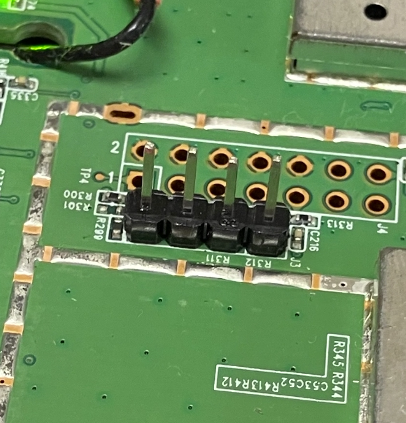
シリアルのピンを立てて、シリアル通信をみたのですが、これ以上進められないので、念のために記録に残しておく。廃品整理していたら出てきた。
シリアルのログに、OpenWrtや WZR-HP-G300NH と記載されているから、間違ったファームを書いてしまったようだ。
[    0.000000] Linux version 5.15.162 (builder@buildhost) (mips-openwrt-linux-musl-gcc (OpenWrt GCC 12.3.0 r24012-d8dd03c46f) 12.3.0, GNU ld (GNU Binutils) 2.40.0) #0 Mon Jul 15 22:14:18 2024
[    0.000000] printk: bootconsole [early0] enabled
[    0.000000] CPU0 revision is: 00019374 (MIPS 24Kc)
[    0.000000] MIPS: machine is Buffalo WZR-HP-G300NH (rtl8366rb)
[    0.000000] SoC: Atheros AR7242 rev 1
[    0.000000] Initrd not found or empty - disabling initrd
[    0.000000] Primary instruction cache 64kB, VIPT, 4-way, linesize 32 bytes.
[    0.000000] Primary data cache 32kB, 4-way, VIPT, cache aliases, linesize 32 bytes
[    0.000000] Zone ranges:
[    0.000000]   Normal   [mem 0x0000000000000000-0x0000000003ffffff]
[    0.000000] Movable zone start for each node
[    0.000000] Early memory node ranges
[    0.000000]   node   0: [mem 0x0000000000000000-0x0000000003ffffff]
[    0.000000] Initmem setup node 0 [mem 0x0000000000000000-0x0000000003ffffff]
[    0.000000] Built 1 zonelists, mobility grouping on.  Total pages: 16240
[    0.000000] Kernel command line: console=ttyS0,115200 rootfstype=squashfs,jffs2
[    0.000000] Dentry cache hash table entries: 8192 (order: 3, 32768 bytes, linear)
[    0.000000] Inode-cache hash table entries: 4096 (order: 2, 16384 bytes, linear)
[    0.000000] Writing ErrCtl register=00000000
[    0.000000] Readback ErrCtl register=00000000
[    0.000000] mem auto-init: stack:off, heap alloc:off, heap free:off
[    0.000000] Memory: 55912K/65536K available (6098K kernel code, 601K rwdata, 784K rodata, 1212K init, 216K bss, 9624K reserved, 0K cma-reserved)
[    0.000000] SLUB: HWalign=32, Order=0-3, MinObjects=0, CPUs=1, Nodes=1
[    0.000000] NR_IRQS: 51
[    0.000000] CPU clock: 400.000 MHz
[    0.000000] clocksource: MIPS: mask: 0xffffffff max_cycles: 0xffffffff, max_idle_ns: 9556302233 ns
[    0.000002] sched_clock: 32 bits at 200MHz, resolution 5ns, wraps every 10737418237ns
[    0.008031] Calibrating delay loop... 265.42 BogoMIPS (lpj=1327104)
[    0.094238] pid_max: default: 32768 minimum: 301
[    0.100496] Mount-cache hash table entries: 1024 (order: 0, 4096 bytes, linear)
[    0.107815] Mountpoint-cache hash table entries: 1024 (order: 0, 4096 bytes, linear)
[    0.125872] clocksource: jiffies: mask: 0xffffffff max_cycles: 0xffffffff, max_idle_ns: 19112604462750000 ns
[    0.135749] futex hash table entries: 256 (order: -1, 3072 bytes, linear)
[    0.142852] pinctrl core: initialized pinctrl subsystem
[    0.151158] NET: Registered PF_NETLINK/PF_ROUTE protocol family
[    0.158041] thermal_sys: Registered thermal governor 'step_wise'
[    0.178566] clocksource: Switched to clocksource MIPS
[    0.192012] NET: Registered PF_INET protocol family
[    0.197282] IP idents hash table entries: 2048 (order: 2, 16384 bytes, linear)
[    0.206129] tcp_listen_portaddr_hash hash table entries: 1024 (order: 0, 4096 bytes, linear)
[    0.214665] Table-perturb hash table entries: 65536 (order: 6, 262144 bytes, linear)
[    0.222434] TCP established hash table entries: 1024 (order: 0, 4096 bytes, linear)
[    0.230119] TCP bind hash table entries: 1024 (order: 0, 4096 bytes, linear)
[    0.237181] TCP: Hash tables configured (established 1024 bind 1024)
[    0.243798] UDP hash table entries: 256 (order: 0, 4096 bytes, linear)
[    0.250428] UDP-Lite hash table entries: 256 (order: 0, 4096 bytes, linear)
[    0.258043] NET: Registered PF_UNIX/PF_LOCAL protocol family
[    0.263832] PCI: CLS 0 bytes, default 32
[    0.273236] workingset: timestamp_bits=14 max_order=14 bucket_order=0
[    0.289360] squashfs: version 4.0 (2009/01/31) Phillip Lougher
[    0.295203] jffs2: version 2.2 (NAND) (SUMMARY) (LZMA) (RTIME) (CMODE_PRIORITY) (c) 2001-2006 Red Hat, Inc.
[    0.307480] Block layer SCSI generic (bsg) driver version 0.4 loaded (major 251)
[    0.319540] Serial: 8250/16550 driver, 16 ports, IRQ sharing enabled
[    0.330241] printk: console [ttyS0] disabled
[    0.334640] 18020000.uart: ttyS0 at MMIO 0x18020000 (irq = 9, base_baud = 12500000) is a 8250
[    0.343268] printk: console [ttyS0] enabled
[    0.343268] printk: console [ttyS0] enabled
[    0.351703] printk: bootconsole [early0] disabled
[    0.351703] printk: bootconsole [early0] disabled
[    0.363567] physmap-flash 1e000000.flash: physmap platform flash device: [mem 0x1e000000-0x1fffffff]
[    0.372897] physmap-flash 1e000000.flash: map_probe failed
[    0.390623] ag71xx 19000000.eth: invalid MAC address, using random address
[    0.733711] ag71xx 19000000.eth: connected to PHY at fixed-0:00 [uid=00000000, driver=Generic PHY]
[    0.743853] eth0: Atheros AG71xx at 0xb9000000, irq 4, mode: rgmii
[    0.750852] ag71xx 1a000000.eth: invalid MAC address, using random address
[    1.091709] ag71xx 1a000000.eth: Could not connect to PHY device. Deferring probe.
[    1.099964] i2c_dev: i2c /dev entries driver
[    1.108544] NET: Registered PF_INET6 protocol family
[    1.127460] Segment Routing with IPv6
[    1.131412] In-situ OAM (IOAM) with IPv6
[    1.135549] NET: Registered PF_PACKET protocol family
[    1.140783] bridge: filtering via arp/ip/ip6tables is no longer available by default. Update your scripts to load br_netfilter if you need this.
[    1.154334] 8021q: 802.1Q VLAN Support v1.8
[    1.161220] ag71xx 1a000000.eth: invalid MAC address, using random address
[    1.499679] ag71xx 1a000000.eth: Could not connect to PHY device. Deferring probe.
[    1.508005] ag71xx 1a000000.eth: invalid MAC address, using random address
[    1.849661] ag71xx 1a000000.eth: Could not connect to PHY device. Deferring probe.
[    1.857702] clk: Disabling unused clocks
[    2.151555] irq 9: nobody cared (try booting with the "irqpoll" option)
[    2.158228] CPU: 0 PID: 1 Comm: swapper Not tainted 5.15.162 #0
[    2.164198] Stack : 00000000 00000004 00000000 00000000 00000000 00000000 00000000 00000000
[    2.172662]         00000000 00000000 00000000 00000000 00000000 00000001 80c0bcb8 efd39b6a
[    2.181120]         80c0bd50 00000000 00000000 80c0bb58 00000038 80330b64 00000000 ffffffea
[    2.189579]         00000050 80c0bb64 00000050 8072a078 80668940 80c0bc98 00000009 00000001
[    2.198038]         0000001f 8079b788 8078e480 00000002 00000018 8039cb74 00000000 808e0000
[    2.206496]         ...
[    2.208964] Call Trace:
[    2.208983] [<80330b64>] 0x80330b64
[    2.214961] [<8039cb74>] 0x8039cb74
[    2.218480] [<80066544>] 0x80066544
[    2.221994] [<8006654c>] 0x8006654c
[    2.225507] [<800c5264>] 0x800c5264
[    2.229024] [<800c5780>] 0x800c5780
[    2.232549] [<800c2a1c>] 0x800c2a1c
[    2.236067] [<800c27dc>] 0x800c27dc
[    2.239583] [<800c6148>] 0x800c6148
[    2.243106] [<800c20e0>] 0x800c20e0
[    2.246628] [<80331194>] 0x80331194
[    2.250142] [<800c7258>] 0x800c7258
[    2.253657] [<800c209c>] 0x800c209c
[    2.257177] [<800b2b3c>] 0x800b2b3c
[    2.260692] [<80653bec>] 0x80653bec
[    2.264205] [<800e4780>] 0x800e4780
[    2.267722] [<80330e38>] 0x80330e38
[    2.271239] [<80062198>] 0x80062198
[    2.274771] [<80331250>] 0x80331250
[    2.278290] [<80330e38>] 0x80330e38
[    2.281805] [<80087f00>] 0x80087f00
[    2.285325] [<800c7258>] 0x800c7258
[    2.288847] [<80330e38>] 0x80330e38
[    2.292367] [<80062198>] 0x80062198
[    2.295887]
[    2.297384] handlers:
[    2.299670] [<(ptrval)>] 0x8039a264
[    2.303192] Disabling IRQ #9
[    2.308053] /dev/root: Can't open blockdev
[    2.312299] VFS: Cannot open root device "(null)" or unknown-block(0,0): error -6
[    2.319864] Please append a correct "root=" boot option; here are the available partitions:
[    2.328271] Kernel panic - not syncing: VFS: Unable to mount root fs on unknown-block(0,0)
[    2.336590] Rebooting in 1 seconds..
ログは、ここまで表示され、20秒ほどでリブートする。Ctrl+c で入力画面にいけると思っていたが、全く受け付けてくれない
tftp server(recive) go と表示されたときに、Ctrl+cを押すという説明の記事があるので、本機は中途半端にファームが書かれたのかと思う。
復帰方法が分からないので、放置しておきます。

- mk
- iperf2とiperf3 2026年9月22日
- InfiniCLOUD新規25GB、さらに50GB追加で、75GBスタート 2026年8月24日
- RLoginをコマンドラインで使う 2026年8月24日
- モバイルを収容してルーターにする 2026年7月30日
- OpenWrtでウェブカメラを使用する 2026年7月23日